Catch Mode
Capture incoming HTTP requests without running a local server. Like webhook.site built into your tunnel tool. No competitor offers this.
The problem
You're integrating a new webhook provider — Stripe, GitHub, Twilio, Shopify. You need to see what they send. But you haven't written a handler yet. So you either:
- Use webhook.site (separate tool, separate browser tab, copy-paste the URL, switch back)
- Write a throwaway Express handler with
console.log(req.body), run it, point the webhook at your tunnel, then delete the code
Both waste time. Catch mode eliminates the middleman.
How it works
workslocal catch --name stripe
This creates a public HTTPS URL (https://stripe.workslocal.exposed) that:
- Accepts any HTTP request (GET, POST, PUT, PATCH, DELETE, OPTIONS)
- Returns a static response (default:
200 OKwith{"ok":true}) - Captures the full request — method, path, headers, body, query params
- Displays it in the terminal and the web inspector at
localhost:4040 - Does NOT forward to localhost — no local server needed
The caller (Stripe, GitHub, your test script) gets a valid HTTP response, so it thinks the webhook was delivered successfully. Meanwhile, you're inspecting the payload at your leisure.
What the caller sees
$ curl https://stripe-payments.workslocal.exposed
{"ok":true}
Step-by-step workflow
1. Start catching
workslocal catch --name stripe-payments
Output:
────────────────────────────────────────────────────────────

✔ Catch mode active!

Public URL:   https://stripe-payments.workslocal.exposed
Inspector:    http://localhost:4040
Returning:    200 {"ok":true}
Subdomain:    stripe-payments

Paste the URL in your webhook dashboard.
All requests appear below and at http://localhost:4040

Press Ctrl+C to stop.

────────────────────────────────────────────────────────────

GET     / 200 1ms
GET     /favicon.ico 200 0ms
2. Configure the webhook provider
Go to your webhook provider's dashboard and paste the tunnel URL:
- Stripe: Dashboard → Developers → Webhooks → Add endpoint →
https://stripe-payments.workslocal.exposed/webhooks/stripe - GitHub: Repo → Settings → Webhooks → Add webhook →
https://stripe-payments.workslocal.exposed/github - Twilio: Console → Phone Numbers → Configure → Webhook URL →
https://stripe-payments.workslocal.exposed/sms
3. Trigger a test event
Most providers have a “Send test event” button. Click it.
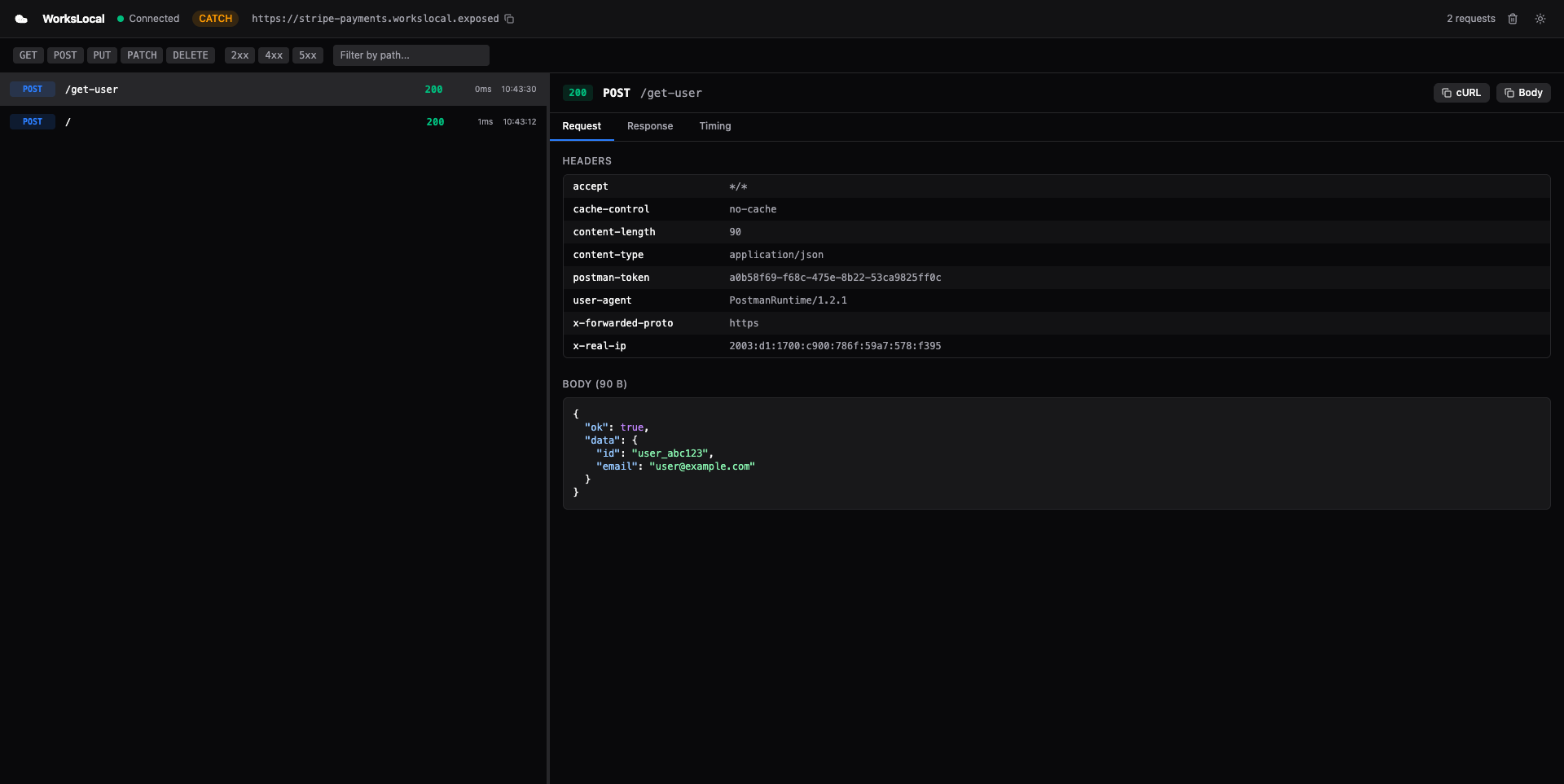
4. Inspect the payload
The request appears in your terminal:
POST /webhooks/stripe 200 2msAnd in the web inspector at localhost:4040:
- Full request headers (including
Stripe-Signature,Content-Type,User-Agent) - Complete JSON body with syntax highlighting
- Query parameters (if any)
- The
x-workslocal-mode: catchresponse header
5. Switch to tunnel mode
Once you've seen the payload and written your handler:
# Stop catch mode (Ctrl+C)
# Start tunnel mode with the same subdomain
workslocal http 3000 --name stripe-payments
The URL stays the same — https://stripe-payments.workslocal.exposed. No need to update the webhook dashboard. Your handler now receives real webhook data through the exact same URL.
Customizing the response
By default, catch mode returns 200 OK with {"ok":true}. You can customize this:
Custom status code
workslocal catch --name test --status 202
Returns 202 Accepted to every request. Useful when a provider expects a specific status code.
Custom response body
workslocal catch --name test --body '{"received": true}'Returns the specified body. The Content-Type header defaults to application/json.
How it works internally
Catch mode uses the same TunnelClient as workslocal http, but with a proxyOverride instead of the LocalProxy.
Normal mode flow
http_request (from relay)
  → LocalProxy.forward(msg, localPort)
    → http.request to localhost:3000
    → wait for response
  → http_response (back to relay)
Catch mode flow
http_request (from relay)
  → CatchProxy.respond(msg)
    → return { statusCode: 200, headers: {...}, body: "" }
    → NO network call to localhost
  → http_response (back to relay)
The CatchProxyis a simple function that returns a static response object. It's created in catch-proxy.ts:
export function createCatchProxy(options: CatchProxyOptions): CatchProxy {
  return {
    respond(msg: HttpRequestMessage): LocalProxyResponse {
      return {
        statusCode: options.statusCode,
        headers: {
          'content-type': 'application/json',
          'x-workslocal-mode': 'catch',
          ...options.responseHeaders,
        },
        body: Buffer.from(options.responseBody || '').toString('base64'),
      };
    },
  };
}
The request is still captured by the RequestStore and pushed to the inspector via SSE — exactly like normal mode. The only difference is where the response comes from.
Response header
Every catch mode response includes:
x-workslocal-mode: catch
This lets you (or the caller) distinguish catch mode responses from real server responses.
Use cases
Webhook development
The primary use case. See what Stripe, GitHub, Twilio, Shopify, Clerk, or any other service sends before writing handler code.
workslocal catch --name stripe
# Paste URL in Stripe dashboard
# Trigger test event
# See payload in inspector
API contract discovery
Working with a poorly documented API that calls your endpoint? Use catch mode to see exactly what they send — method, headers, body structure, authentication headers.
Load testing inspection
Point a load testing tool (k6, Artillery, wrk) at your catch URL and inspect the request patterns without running a server.
workslocal catch --name load-test
# In another terminal:
k6 run --vus 10 --duration 30s -e URL=https://load-test.workslocal.exposed script.js
# View all requests in inspector
CI/CD webhook debugging
Configure your CI provider (GitHub Actions, GitLab CI, CircleCI) to send webhook events to a catch URL. Inspect the payload structure without deploying a handler.
Quick mock endpoint
Need a quick endpoint that returns a specific response for integration testing?
workslocal catch --name mock-api --status 201 --body '{"id": "usr_123", "name": "Test User"}'Any request to https://mock-api.workslocal.exposed/* returns the specified response.
Catch mode vs webhook.site
| Feature | WorksLocal catch mode | webhook.site |
|---|---|---|
| Setup | One terminal command | Open browser, copy URL |
| Same tool as tunnel | Yes — switch to http mode with same URL | No — separate tool entirely |
| Inspector | Built-in at localhost:4040 | Web-based |
| Custom subdomain | Yes (--name) | No (random only) |
| Custom response | Yes (--status, --body) | Limited (paid) |
| Self-hostable | Yes (MIT license) | No |
| Data privacy | Local only — nothing stored on server | Stored on their servers |
| Persistent URL | Yes (with account) | Expires |
| Offline viewing | Yes (inspector runs locally) | Requires internet |
| Copy as cURL | Yes | Limited |
| Cost | Free forever | Free tier + paid |
Limitations
- No request queuing for later replay— catch mode captures requests but cannot “hold” them and replay them to your local server when it comes online. This is a planned feature. Currently, switching from catch to tunnel mode means the webhook provider needs to re-send events.
- Static response only — every request gets the same response. You cannot return different responses based on the request path, method, or body. For dynamic mock responses, use tunnel mode with a simple local server.
- No webhook signature verification — catch mode does not verify Stripe signatures, GitHub HMAC, or other webhook authentications. Signature verification display in the inspector is planned.
- In-memory only — captured requests are lost when the CLI exits. The 1,000 request ring buffer limit applies.
- No response delay — the response is instant. You cannot simulate slow endpoints. Configurable response delay is planned.
- HTTP only — catch mode does not capture WebSocket connections. WebSocket frames pass through the tunnel but are not stored in the RequestStore.
Tips
Name your catch URLs meaningfully
workslocal catch --name stripe-payments
workslocal catch --name github-pushes
workslocal catch --name twilio-sms
Descriptive names make it easy to keep webhook URLs organized across projects.
Use the inspector API for automation
# Wait for a request to arrive, then extract the body
while true; do
  BODY=$(curl -s http://localhost:4040/api/requests | jq '.[0].requestBody' -r)
  if [ "$BODY" != "null" ]; then
    echo "$BODY" | base64 -d | jq .
    break
  fi
  sleep 1
done
Combine with --json for scripts
workslocal catch --name test --json 2>/dev/null &
PID=$!
# ... trigger webhook ...
curl -s http://localhost:4040/api/requests | jq '.[0]'
kill $PID